Microsoft 365 Intranet Integration
Microsoft 365 gives your organization a secure, trusted place to work. Unily gives every employee one engaging place to start the day with SharePoint, Teams, Outlook, OneDrive, Copilot agents, company news, and knowledge all together across desktop and mobile.



Your entire stack working as one

Your M365 apps, in one place
SharePoint, OneDrive, Teams, Outlook, and Power BI sit alongside company news, knowledge and your other business apps, so employees spend less time switching between tools.

From finding to doing
With Unily Glass, all employees can find and preview a SharePoint file, check an email or use a Copilot agent built specifically for their role or need, from one conversational interface, without leaving the flow of work.

Maximize Microsoft ROI
Drive valuable adoption of Microsoft apps with easy access to productivity tools without complexity. Build Copilot trust and adoption with governed role based access and always-accurate organizational knowledge fueling responses.


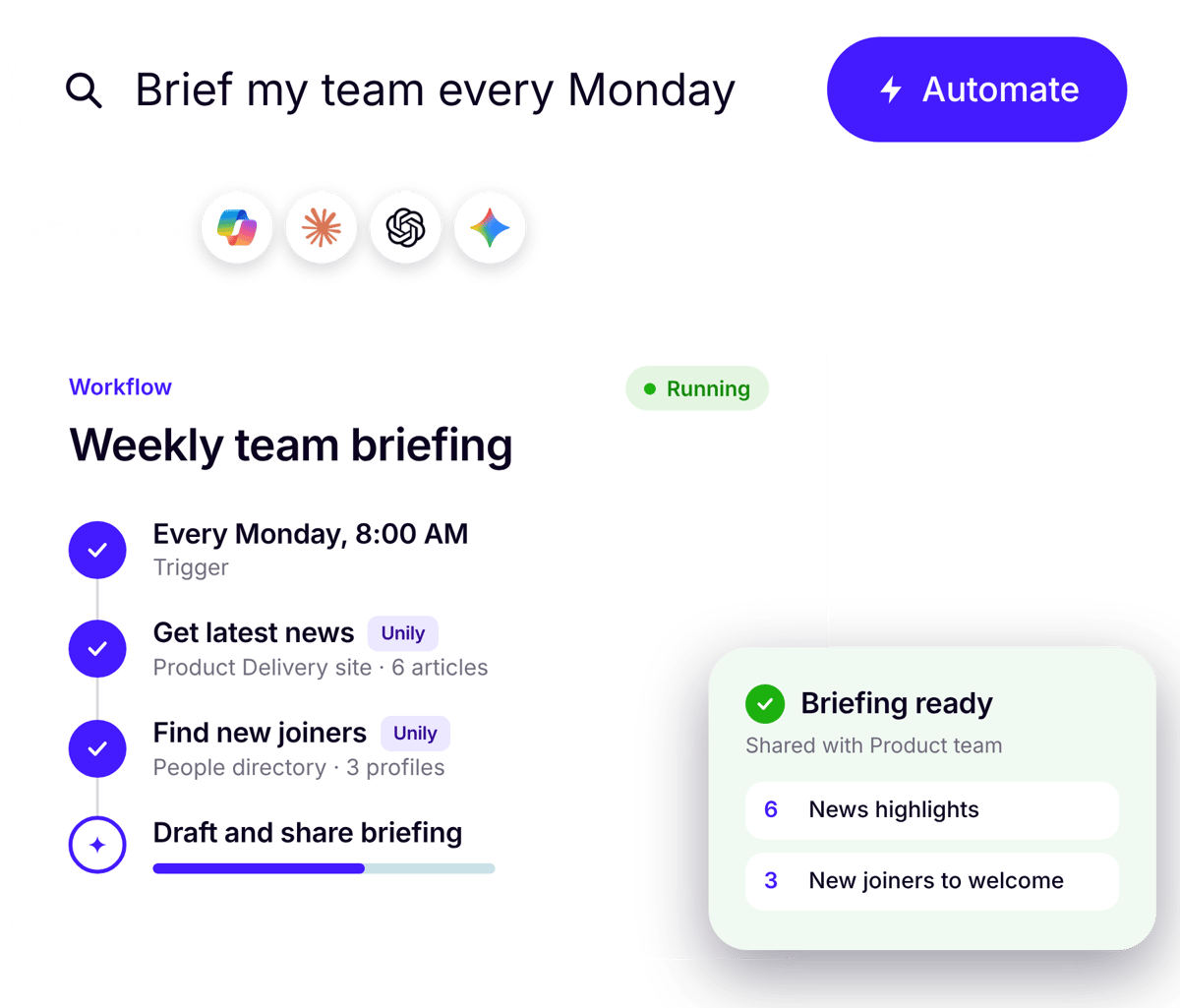
Microsoft 365 in Unily Glass
Ask in plain language and act across Microsoft 365: find and preview SharePoint and OneDrive files, view emails and accept meeting invites from one conversational interface.
Unily MCP Server
Bring real-time trusted workplace knowledge like news and policies into Copilot. The Unily MCP Server builds AI trust with users with secure, governed access to organizational knowledge.
 Entra ID
Easily connect and manage your people and technology
Sign in once with Microsoft Entra ID, including Microsoft Authenticator. Real-time sync with Entra ID keeps Unily up-to-date, so new colleagues can be enrolled in the right experiences automatically. OneDrive
Remove friction by getting workers what they need, fast
Search for and surface OneDrive documents directly within Unily, making document management and collaboration seamless and simple. Teams
Facilitate effortless collaboration and communication
Bring Microsoft Teams channels into your intranet, connect team members, and share content directly from Unily, helping users get the most from Teams in a single platform. Outlook
Enable the flow of work with instant access
Stay on top of your working day with integrated access to your Microsoft Outlook and Calendar, including the ability to accept invites at the click of a button. Viva Engage
Provide centralized access to social within the broader fabric of work
Stay connected and interact with key social channels all within Unily, with commenting and sharing across your channels powered by Viva Engage. Power BI
Expand employee understanding with greater visibility
Context is king. Place Power BI reports into the wider context of your business and provide a central location to share deep insight with the right people. Dynamics 365
Bring customer and business data into the flow of work
Surface key Dynamics 365 records, updates, and insights directly within Unily, giving frontline and office teams the context they need without switching between systems. Microsoft Planner
Keep projects moving with visibility in one place
Track tasks and deadlines from Planner right inside Unily, so everyone knows what’s next and progress stays on course. Microsoft To-Do
Help employees stay focused on what matters most
Give workers a clear view of their personal tasks from Microsoft To Do within Unily, making it simple to prioritize the day and get things done. OneNote
Make knowledge easy to capture, find, and share
Access OneNote notebooks from within Unily, keeping meeting notes, ideas, and your team knowledge base close at hand and connected to the rest of your digital workplace.
Microsoft 365 and the rest of your stack
Your people also use HR, IT and CRM systems. Unily connects Microsoft 365 alongside ServiceNow, Workday, Salesforce and more, so there's one place to start work.

Copilot grounded in knowledge you trust
Content management in Unily has owners, review reminders and target audiences. The Unily MCP Server and Microsoft Copilot Connector let Copilot agents use that knowledge, so answers are always accurate.

20-year Microsoft partnership
Unily is hosted on Microsoft Azure, uses Microsoft Entra ID for identity and co-developed capabilities such as the Unily Copilot Connector to drive valuable adoption of Microsoft applications.
"Rolling out a new platform in just eight weeks is almost unheard of at this scale – but Unily made it possible."
Peter Lyons, Head of Internal Communications, British Airways

Explore Customer Stories
Across the globe, in every industry, Unily is empowering workforces to connect and thrive.

91% of employees
use Unily every month

BA brought together a SharePoint intranet and workplace apps in one mobile-first experience, launched in just 8 weeks.


5,000 of 17,000 employees AI-accredited in under a year by combining Microsoft Copilot with Unily.


73,000 employees united in one experience, with new colleagues enrolled automatically through real-time sync with Microsoft Entra ID.
Empowering every function to move faster, together
For IT Leaders
-
Build on Microsoft foundations: Unily is hosted on Microsoft Azure, with real-time Microsoft Entra ID sync and single sign-on, including Microsoft Authenticator.
-
Help more people use the Microsoft 365 apps you've invested in by bringing them into one employee experience.
-
Connect Microsoft 365 alongside ServiceNow, Workday, Salesforce and more through Unily's integrations framework, without rebuilding your infrastructure.
For Internal Communications
-
Publish once and extend campaigns across Unily, Teams, Outlook and Viva Engage from a single publishing interface.
-
Make your news and knowledge available to Copilot, so employees get answers from approved communications.
-
Drive adoption and employee engagement through everyday usefulness: when Unily is where employees reach their Microsoft apps, communications land in the flow of their day.


For Employees
-
Start your day in one place, with news, knowledge and your Microsoft apps together.
-
Ask Unily Glass to find a file, check an email or accept an invite, without switching apps.
-
Get the same experience on desktop and mobile, wherever you work.

-
Build on Microsoft foundations: Unily is hosted on Microsoft Azure, with real-time Microsoft Entra ID sync and single sign-on, including Microsoft Authenticator.
-
Help more people use the Microsoft 365 apps you've invested in by bringing them into one employee experience.
-
Connect Microsoft 365 alongside ServiceNow, Workday, Salesforce and more through Unily's integrations framework, without rebuilding your infrastructure.
-
Publish once and extend campaigns across Unily, Teams, Outlook and Viva Engage from a single publishing interface.
-
Make your news and knowledge available to Copilot, so employees get answers from approved communications.
-
Drive adoption and employee engagement through everyday usefulness: when Unily is where employees reach their Microsoft apps, communications land in the flow of their day.
-
Start your day in one place, with news, knowledge and your Microsoft apps together.
-
Ask Unily Glass to find a file, check an email or accept an invite, without switching apps.
-
Get the same experience on desktop and mobile, wherever you work.